Memory usage and squeezing Lander into the unexpanded Archimedes 305
Compared to the memory-intensive Elite, David Braben's previous game, the memory available to Lander feels positively spacious - the BBC Micro had just 32K compared to 512K in the smallest model in the original Archimedes range. But even with all this extra RAM, Lander has to be careful with how it consumes its memory. Here we take a look at the memory map for Lander.
In the Archimedes, any physical RAM installed in the machine is mapped by the memory controller (MEMC) into various parts of the first 32MB of the memory map, which runs from 0 to &2000000. As the maximum amount of physical RAM on an Archimedes is only 4MB, there is plenty of space in the 32MB memory map that isn't mapped to physical memory, and trying to access this will give the "Abort on data transfer" error that is familiar to anyone who has done any coding on the early ARM chips.
The currently running application is always mapped to &00008000 - so in terms of Lander, that's the main game code and all of its workspace and buffer RAM, including the game's own stack. Screen memory is mapped to the top of the memory map, ending at &01FFFFFF. As Lander needs two banks of screen memory with 80K for each bank, this means the two screen memory banks live at &01FD8000 and &01FEC000. The operating system allocates various other memory blocks on top of these, such as the system heap, the sprite area and so on, and the first 32K of the memory map from 0 to &00007FFF is always reserved for the system workspace.
The application is allocated whatever memory is left once everything else has taken a bite. As a result, when running Lander on the Archimedes A305 with its relatively modest 512K of memory, you have to quit the desktop and run a utility called USEGAME before the game will run. USEGAME unplugs the modules containing the font and window managers, disables the desktop and sets the screen size to exactly 160K, thereby leaving just enough free memory for the game itself. Lander itself requires a minimum of 172K of application RAM, as the game takes up memory from &00008000 to &00032FF0, which is just eight bytes shy of 172K.
Here's the memory map for Lander:
  +--------------------------------------+   &01FFFFFF
  |                                      |
  | Screen bank 1                        |
  |                                      |
  +--------------------------------------+   &01FEC000
  |                                      |
  | Screen bank 2                        |
  |                                      |
  +--------------------------------------+   &01FD8000
  |                                      |
  .                                      .
  .                                      .
  .                                      .
  .                                      .
  .                                      .
  |                                      |
  +--------------------------------------+   &00032FF0
  |                                      |
  | Graphics buffers (12 * 4308 bytes)   |
  |                                      |
  +--------------------------------------+   &00026600
  |                                      |
  | Object map (256 * 256 bytes)         |
  |                                      |
  +--------------------------------------+   &00016600 = objectMap
  |                                      |
  | &00016580 - &000165FC unused         |
  |                                      |
  +--------------------------------------+   &00016580
  |                                      |
  | Particle data buffer (484 * 8 words) |
  |                                      |
  +--------------------------------------+   &00012900 = particleData
  |                                      |
  | Variable workspace                   |
  |                                      |
  +--------------------------------------+   &00012200 = workspace
  |                                      |
  | Descending stack (128 words)         |
  |                                      |
  +--------------------------------------+   &00012000
  |                                      |
  | &00011A10 - &00011FFC unused         |
  |                                      |
  +--------------------------------------+   &00011A10 = end of divisionTable
  |                                      |
  | Main game code                       |
  |                                      |
  +--------------------------------------+   &00008000 = landscapeOffset
  |                                      |
  | System workspace                     |
  |                                      |
  +--------------------------------------+   &00000000
There isn't a lot of unused space in there, though there are some unused routines in the code, and a block of unused memory after the main game code and before the stack.
Lander code as an image
-----------------------
To see just how small the game code for Lander is, we can convert the main game binary into an image, with one byte per pixel, and a greyscale showing each byte's value, with 0 being shown as black, 255 being shown as white, and interim values as greyscale pixels. The result is a 199-pixel square, like this (shown here at double size, so you can see the pixels more clearly):
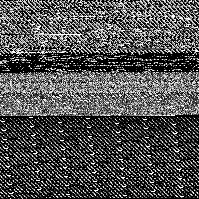
This image contains the entire game, including all the lookup tables. That's some nice, bloat-free code!
Things get even more interesting when the image is set to be 256 pixels wide. ARM code is four-byte aligned, so this version brings out the structure of the code much more clearly:
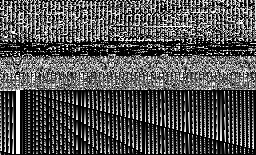
The "rising sun" effect in the bottom half of the image is created by the 64-part division table; indeed, most of the code in this image is actually lookup tables. From top to bottom, here's a quick tour:
- The game code itself runs from landscapeOffset at the top-left of the image down to PrintHexDigit, just before the image turns mottled black. This accounts for the first 26.9% of the image and is clearly aligned into four-byte ARM instructions.
- Then come the object definitions from objectRock to objectRocket, which account for the next 9.6% of the image and appear as a mottled black band about a quarter of the way down.
- The remaining 63.5% of the image consists purely of lookup tables. The random-looking section between the black band and the "rising sun" block consists of the sinTable, arctanTable and squareRootTable tables. To cap it all off, the distinctive "sun beams" of the divisionTable take up the remaining 41.6% of the codebase, with the effect being caused by 64 sequential division tables with increasing denominators.
It's very satisfying to see that the code is as beautiful when it's an image as it is when it's ARM code.